05 · TypeScript · Chrome extension
AcademicReader
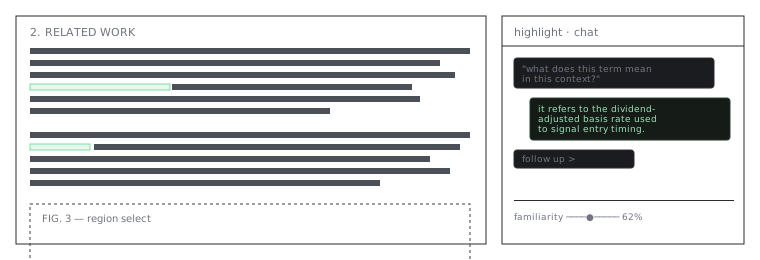
A Chrome extension that opens academic PDFs in a custom viewer, flags confusing text with an LLM, and gives every highlight — and the document as a whole — its own persistent chat.
Everything runs inside the extension itself — no server, no separate process (a locally
authenticated Codex CLI is the one opt-in exception). Storage is IndexedDB /
chrome.storage.local, and it talks directly to whichever provider you configure:
Anthropic, Google Gemini, DeepSeek, OpenAI, or Codex CLI logged in with a ChatGPT account instead of
a paid API key.
Three ways to create a highlight
Auto-scan runs when you open a PDF, flagging confusing spans automatically; a repeat occurrence of the same flagged phrase elsewhere in the document shares the same highlight and the same conversation, rather than starting a new one. Region-select lets you drag a box over a figure or table for an explanation. Select text, ask AI highlights only the exact passage you chose, independent of whatever auto-scan did or didn't flag. A separate global PDF chat is scoped to the whole document — for questions like "what's the main contribution of this paper?" that don't hang off one passage — and is given the document's full extracted text (capped around 40,000 characters) rather than just local context.
Where it auto-redirects vs. needs a click
rules.json only auto-redirects PDF URLs it can match by a reliable, stable pattern:
arXiv, ACM, OpenReview, ACL Anthology, Springer, and PMC/NCBI. Everything else on the granted-domain
list — IEEE, ScienceDirect, Nature, JSTOR, ResearchGate, SSRN, and others — has host permission but no
auto-redirect rule yet, so you open the PDF and click the toolbar icon. For anything not on that
list at all, a popup field accepts any PDF URL directly and requests permission for that origin at
runtime, a one-time browser prompt.
Data
Documents, highlights, and chat history live in the browser profile's IndexedDB for the extension — nothing is synced or sent anywhere except the direct calls to your configured LLM provider. Uninstalling the extension, or clearing its site data, deletes this history.